Overview
Security Events are logs generated by the Windows operating system to record security-related activities such as logon attempts, account management operations, policy changes, and any actions that may impact the security posture of the device. These events are captured in the Windows Security Event Log, which is a core component of Windows auditing.
In Saner CVEM, these Windows Security Events are collected and displayed under:
Endpoint Management → Checks → Security Events
This allows administrators to quickly review important security-related actions occurring on endpoints.
What are Windows Security Events?
Windows Security Events are generated by the Security Log of the Windows Event Viewer. These events help track:
Authentication & Logon Activity
Successful and failed user logons
Remote authentication attempts
Locked-out accounts
Account & User Management
Creation, deletion, or modification of user accounts
Password changes
Permission or privilege updates
System & Policy Changes
Security policy modifications
Audit policy updates
System integrity-related events
Resource Access
File access attempts
Registry access
Object permission changes
These logs are essential for security auditing, troubleshooting, incident response, and compliance requirements.
How Saner CVEM Displays Security Events
When the Saner CVEM agent collects Windows Security Events, they are shown under:
➡ EM → Checks → Security Events
Here, the Result Pane provides a structured table with detailed information for each captured event.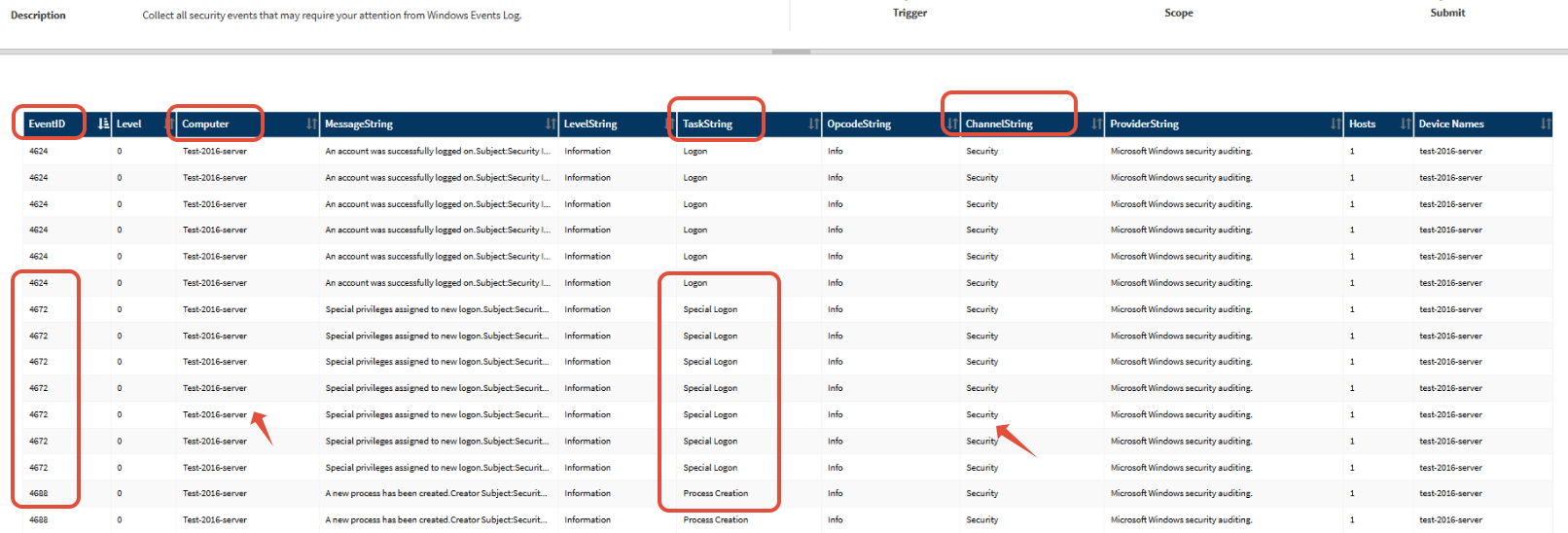
Understanding the Report Fields
When you export CSV or view the Security Events Report, you will see the following fields:
| Field Name | Description |
|---|---|
| EventID | The unique identifier assigned by Windows for each event type (e.g., 4624 = Successful Logon) |
| Level | The raw numeric severity level of the event (e.g., 0, 1, 2) |
| LevelString | Human-readable severity, such as "Information," "Warning," or "Error" |
| Computer | Hostname of the device on which the event was generated |
| MessageString | Detailed message describing the event—includes details such as user, logon type, source IP, etc. |
| TaskString | Describes the task category associated with the event (e.g., "Logon," "Account Management") |
| OpcodeString | Specifies the operation that triggered the event |
| ChannelString | Indicates the Windows log channel for security events, this is typically "Security" |
| ProviderString | The Windows component or service that generated the event (e.g., Microsoft-Windows-Security-Auditing) |
| Hosts / Device Names | Displays the device names or host identifiers associated with the events |
These fields help administrators analyze what happened, when it happened, and on which device.
Why this important
Monitoring Windows Security Events through Saner CVEM helps you:
Detect unauthorized access
Track failed login attempts
Audit user or system changes
Strengthen your security posture
Support compliance audits (ISO, PCI-DSS, HIPAA, SOC2, etc.)
Conclusion
Saner CVEM provides a centralized view of important Windows Security Events under EM → Checks → Security Events, enabling faster investigation and improved visibility into endpoint security activities. The report fields offer detailed insights to help administrators understand and act upon security-critical events across their environment.
Was this article helpful?
That’s Great!
Thank you for your feedback
Sorry! We couldn't be helpful
Thank you for your feedback
Feedback sent
We appreciate your effort and will try to fix the article