Overview
Data Execution Prevention (DEP) is a critical Windows security feature designed to prevent malicious code from executing in memory regions that are intended for data only. Many modern cyberattacks exploit memory-based vulnerabilities such as buffer overflows-to inject and run unauthorized code. DEP helps mitigate these risks by enforcing strict memory execution rules at both the hardware and software levels.
Saner CVEM provides centralized control to configure DEP settings across managed Windows devices, ensuring consistent protection while maintaining operational compatibility.
What Is DEP?
DEP is a protective mechanism built into Windows that differentiates between executable memory regions (code) and non-executable memory regions (data). Its primary goal is to stop malicious activities that attempt to run unauthorized instructions from memory areas meant only for data storage.
Memory is generally categorized into:
Code – executable instructions
Data – stored information used by programs
Attackers often exploit vulnerabilities to execute harmful code from data-only memory regions. DEP intervenes by monitoring memory usage and preventing execution from these restricted areas.
In simple terms:
DEP acts as a barrier that prevents unsafe and unauthorized memory execution, significantly reducing the risk of memory-based attacks.
How Data Execution Prevention Works
DEP uses two types of mechanisms:
1. Hardware-Enforced DEP
Modern CPUs mark specific memory pages as non-executable.
If an application attempts to execute code from such protected memory, the CPU generates an exception.
Windows immediately stops the application, preventing exploitation.
This method offers strong, hardware-level protection.
2. Software-Enforced DEP
Used when the CPU does not support hardware-based execution protection.
Windows monitors memory access patterns and blocks unsafe behavior.
Though not as robust as hardware enforcement, it still protects essential system components and services.
Key Points to Remember
DEP is enabled by default for core Windows processes (OptIn mode).
Administrators can expand DEP protection system-wide using OptOut or AlwaysOn modes.
DEP works silently in the background and may terminate applications performing unsafe memory operations.
DEP Modes and Their Impact
| DEP Mode | Protection Level | Compatibility Impact | Recommended Use Case |
|---|---|---|---|
| OptIn (Default) | Protects only essential Windows programs | Low | Suitable for most systems; default safe mode |
| OptOut | Protects all processes; exclusions allowed | Medium | Stronger security; older apps may require exclusion |
| AlwaysOn | Enforces DEP for all processes without exceptions | High | High-security and compliance-mandated environments |
| AlwaysOff | DEP disabled entirely | Very High Risk | Should only be used for legacy troubleshooting |
How to Enable DEP Settings from Saner CVEM
Use the steps below to configure DEP policies on one or more managed Windows devices:
1. Navigate to Endpoint Management
Log in to the Saner CVEM dashboard and open the Endpoint Management (EM) module.
2. Open Security Feature Actions
Go to the upper-right corner, click Actions, and select Security Feature.
3. Choose the DEP Configuration Option
Under the Actions panel, select Set DEP Settings to open the DEP policy configuration window.
4. Configure the DEP Policy
In the DEP Policies* dropdown, select the appropriate mode:
OptIn – DEP enabled only for essential Windows programs
OptOut – DEP enabled for all applications except those excluded
AlwaysOn – DEP applied universally with no exceptions
AlwaysOff – Disables DEP (not recommended)
Select the mode that aligns with your organization’s security and compatibility requirements.
Example: Choose OptOut to enforce DEP for all programs while allowing specific exclusions.
5. Add Task Metadata
Provide a clear Task Name and Description to ensure easy tracking and auditing of configuration tasks.
6. Select Target Devices
Use the selection panel to choose specific endpoints.
Devices can be filtered by OS, device group, or search criteria for efficient selection.
7. Create and Apply the Task
Review your configuration and click Create Response.
The DEP policy will be deployed during the next agent sync.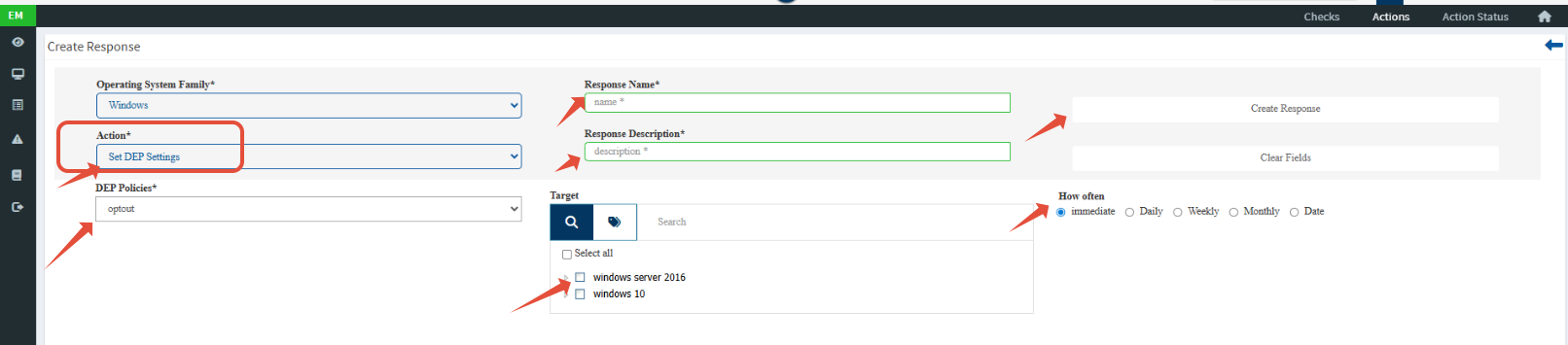
Precautionary Note
Because DEP is a security-sensitive configuration, it can impact legacy or non-compliant applications. To avoid unexpected interruptions:
Always test DEP configuration on a pilot or non-production system first.
Validate application compatibility before enforcing OptOut or AlwaysOn modes across production environments.
Review application behavior after DEP policy changes to ensure stable functioning.
Conclusion
DEP is a powerful defense mechanism against memory-based attacks and is essential for strengthening Windows endpoint security. Saner CVEM provides an efficient and centralized method for managing DEP policies across your environment. By choosing the appropriate DEP mode and following recommended precautions, organizations can enhance protection while maintaining application compatibility.
If you need assistance selecting the DEP settings feel free to reach out to your support team.
Was this article helpful?
That’s Great!
Thank you for your feedback
Sorry! We couldn't be helpful
Thank you for your feedback
Feedback sent
We appreciate your effort and will try to fix the article