Remediation Job or Rule Fails with Windows Installer Exit Code 1618
Issue
A Saner CVEM Remediation Job or Remediation Rule reports that a Windows patch failed to install. Although the patch package may download and validate successfully, the endpoint returns Windows Installer exit code 1618 (0x00000652).
This article explains why the failure occurs and how to restore patching without modifying the remediation job or rule configuration.
Symptoms
The remediation result shows the patch installation as Failed.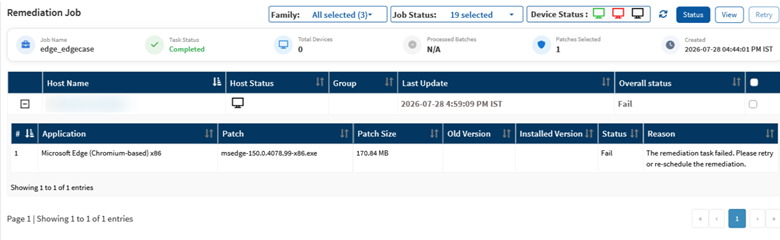
Saner Agent logs may contain:
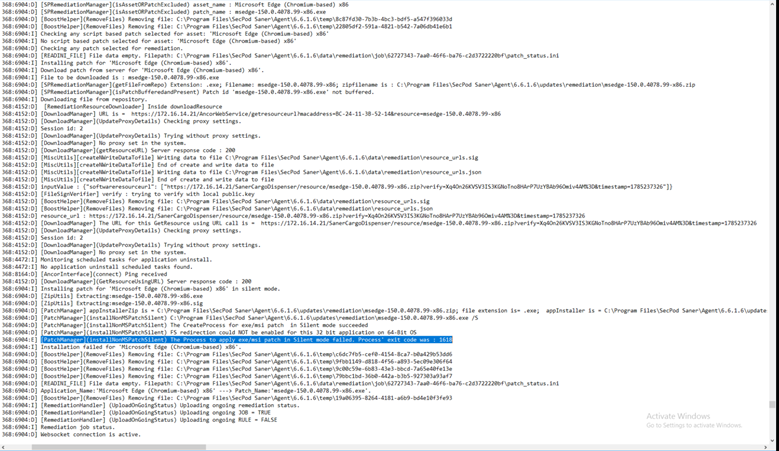
- Exit code 1618
- ERROR_INSTALL_ALREADY_RUNNING
- Messages indicating that another installation is already in progress
In many cases:
- Retrying the remediation immediately results in the same error.
- A manual installation of the same MSI package also fails with exit code 1618.
Cause
Windows Installer (MSI) allows only one installation transaction at a time. When Saner CVEM launches a vendor installer while another process is already using MSIEXEC (such as Windows Update, an application updater, a software repair, uninstall operation, or another deployment tool), Windows rejects the new installation request and returns exit code 1618.
Saner CVEM successfully completes the download, validation, and launch of the installer. The installation is blocked by the native Windows Installer engine due to concurrent MSI activity.
Therefore, this is an endpoint state or installer concurrency issue, not a failure of the Saner CVEM Remediation Job or Remediation Rule engine.
Validation
Confirm the failure details in Saner CVEM and note the patch name, timestamp, and installer exit code. On the endpoint, check Task Manager or approved administrative tooling for an active MSIEXEC process and identify the installation that owns it. Review Windows Event Viewer and the vendor installer log around the same timestamp. If permitted, run the identical installer manually under the same security context and with the same silent parameters. Reproducing code 1618 outside Saner CVEM confirms that Windows Installer contention is the cause.
Review the Saner Agent log and confirm the installer exit code from: C:\Program Files\SecPod Saner\logs\agent\ spsaneragent.log:
Resolution
Please follow the following steps to resolve the Exit Code Failure issue:
- Allow the active installation, update, repair, or uninstall process to complete.
- Do not terminate MSIEXEC while a legitimate installation is in progress, as doing so may leave software in an inconsistent state.
- If the installer process is confirmed to be stalled:
- Follow your organization's change management procedure.
- Close the application that owns the installer session.
- Restart the Windows Installer service, if appropriate.
- Reboot the endpoint during an approved maintenance window.
- After the competing installation has cleared:
- Verify that no installer transactions are running.
- Confirm there are no pending installations or reboots.
Check for Active Windows Installer Processes before proceeding remediation:
Using Command Prompt
tasklist /FI "IMAGENAME eq msiexec.exe"
Using PowerShell
Get-Process msiexec -ErrorAction SilentlyContinue
- Rerun the failed Saner CVEM Remediation Job.
- For a Remediation Rule, use the supported retry mechanism or wait for the next scheduled evaluation.
- Verify that:
- The patch status changes to Installed.
- The associated vulnerability is reassessed and marked as Remediated.
Prevention
To reduce the likelihood of Windows Installer exit code 1618, schedule Saner CVEM remediation activities outside software distribution, Windows Update, application maintenance, and endpoint management windows. Avoid running overlapping remediation jobs against the same device group.
Where operationally feasible:
- Use pilot rings and staggered deployment schedules.
- Monitor endpoints for pending reboots before deployment.
- Check for long-running installer activity that could interfere with patch installation.
If exit code 1618 occurs repeatedly, identify the competing updater, deployment platform, or maintenance process and coordinate ownership and scheduling across teams to prevent installer contention.
Escalation Criteria
Escalate to Saner Support only when the following conditions are met:
- No concurrent installation activity exists on the endpoint.
- The patch installs successfully when executed manually under equivalent conditions.
- Repeated Saner CVEM remediation attempts continue to fail.
Include the following information in the support case:
- Remediation Job ID
- Endpoint details
- Failure timestamps
- Patch metadata
- Installer exit code
- Relevant installer logs ($TEMP\Edge-MSI-exit-code.txt)
- Agent logs (spsaneragent.log)
After a successful retry, document the outcome and close the change ticket with supporting evidence for future incident correlation.
Was this article helpful?
That’s Great!
Thank you for your feedback
Sorry! We couldn't be helpful
Thank you for your feedback
Feedback sent
We appreciate your effort and will try to fix the article