Overview:
Microsoft has additional recommendations for effectively patching the following vulnerability, CVE-2017-8529.
Mitigation of this vulnerability requires the creation of the following Windows Registry entries. This article describes the steps to create these registry settings.
Affected OS:
All supported Microsoft Windows except Windows 10 1709 and Windows 10 1803.
Solution:
- Install the patches recommended in the Microsoft advisory, CVE-2017-8529.
- Create the following registry entries,
Registry Changes,
reg add "HKEY_LOCAL_MACHINE\SOFTWARE\Microsoft\Internet Explorer\Main\FeatureControl\FEATURE_ENABLE_PRINT_INFO_DISCLOSURE_FIX" /v iexplore.exe /t REG_DWORD /d 1 /f

reg add "HKEY_LOCAL_MACHINE\SOFTWARE\WOW6432Node\Microsoft\Internet Explorer\Main\FeatureControl\FEATURE_ENABLE_PRINT_INFO_DISCLOSURE_FIX" /v iexplore.exe /t REG_DWORD /d 1 /f
Automate Patching with Saner:
Saner can automate the above patching across the organization with ease. Follow the below steps to fully patch this vulnerability using Saner.
- Download the attached 'sp_cve-2017-8529_print_info_dis_reg_fix.zip' zip file and unzip to get sp_cve-2017-8529_print_info_dis_reg_fix.exe
- Login to Saner Console
- Switch to the account/site specific view
- Use the EM tool to create an Action
- Select ‘Software Deployment‘ feature
- Click on Upload, which is on the upper right corner.
- Click on the 'Open the file Browser', upload 'sp_cve-2017-8529_print_info_dis_reg_fix.exe' file and Click on Close.
- Once uploaded package is visible, Click on 'exclamation mark' as shown in the below diagram.
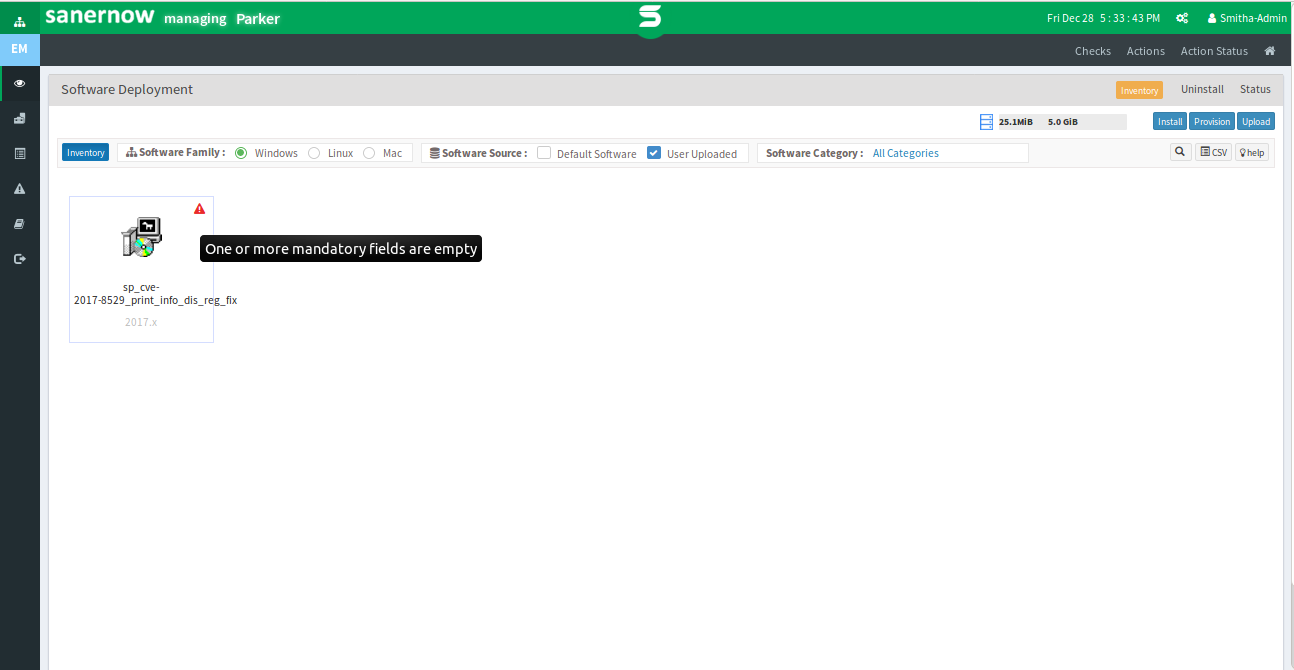
- Click on edit in the newly opened window and set the for 'Install Option' as /S click on 'Update Details' as sown in the below diagram.
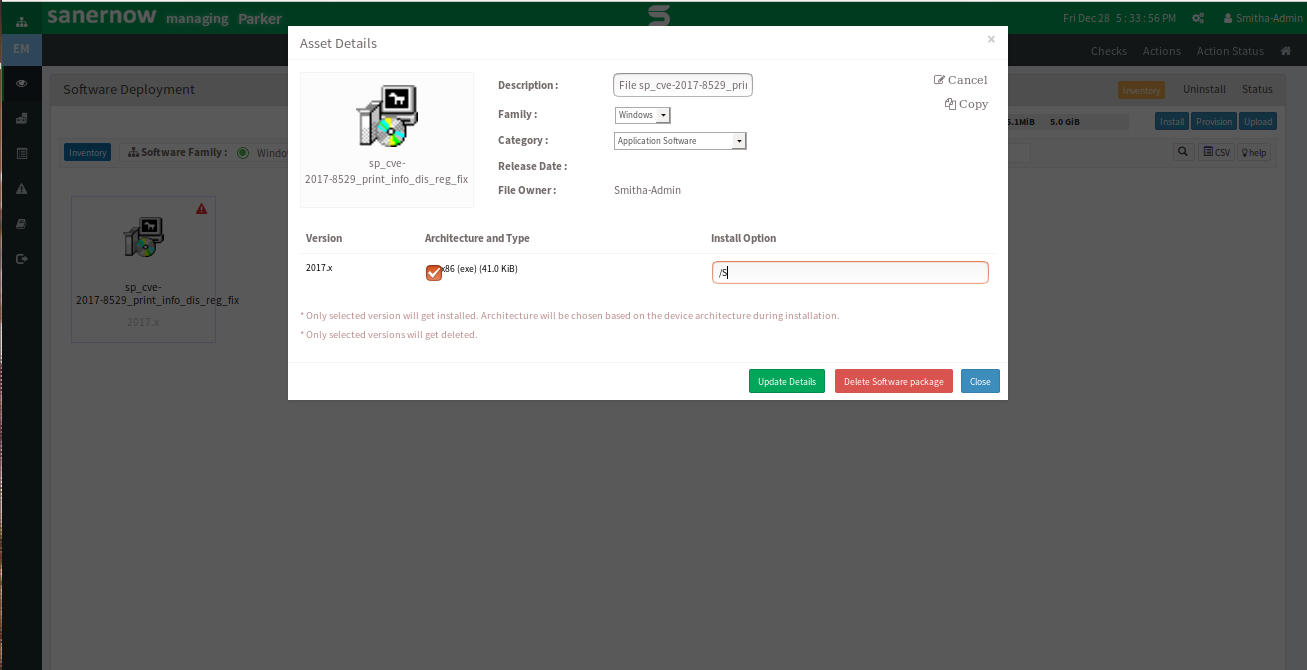
- Select uploaded package and click on Install, which is in the upper right corner.
- Select 'Group' for which we need to apply the workaround and click 'next'
- Enter the required details and click on 'Create Installation task' as shown in the below diagram.
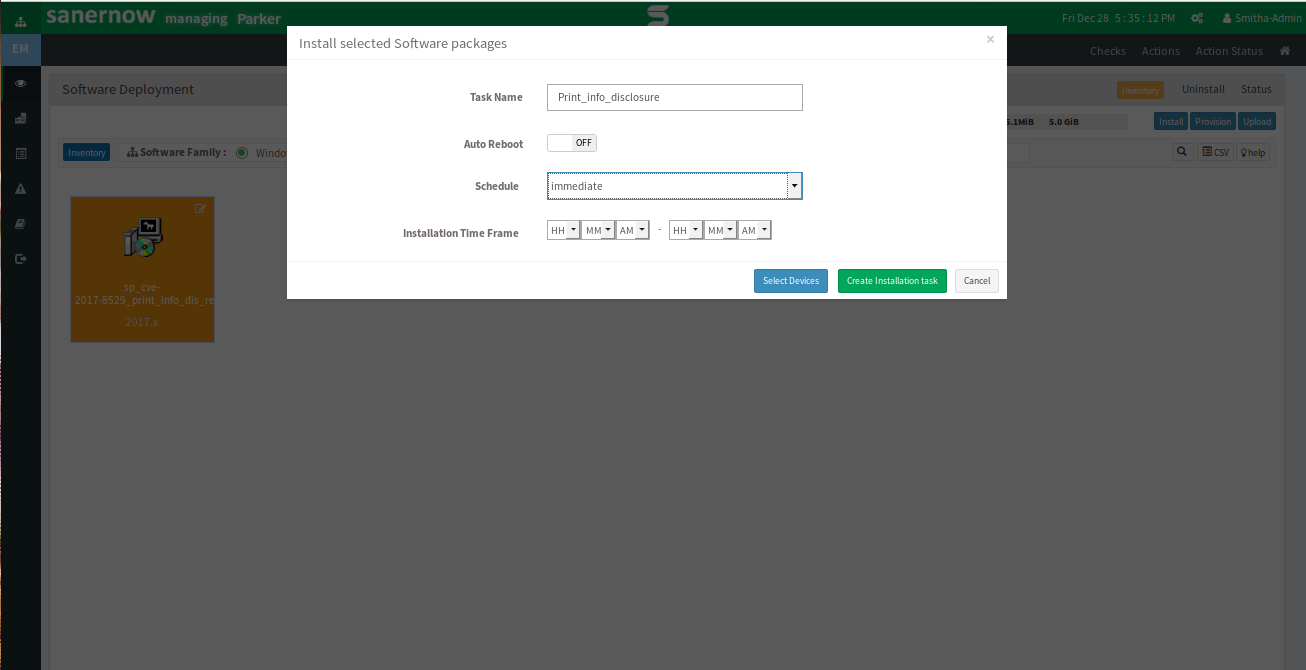
References:
https://portal.msrc.microsoft.com/en-US/security-guidance/advisory/CVE-2017-8529
Was this article helpful?
That’s Great!
Thank you for your feedback
Sorry! We couldn't be helpful
Thank you for your feedback
Feedback sent
We appreciate your effort and will try to fix the article